Label sheets that work
Pick the sheet by the number on the box. These are built in, with each label’s size and position measured to the point.
| Sheet | Label size | Avery®-compatible |
|---|---|---|
| Address labels, 30 per sheet | 1 × 2⅝ in | 5160, 8160, 5260, 8460, 18160 |
| Address labels, 20 per sheet | 1 × 4 in | 5161, 8161 |
| Address labels, 14 per sheet | 1⅓ × 4 in | 5162, 8162 |
| Return address labels, 80 per sheet | ½ × 1¾ in | 5167, 8167 |
| Shipping labels, 10 per sheet | 2 × 4 in | 5163, 8163, 5263 |
| Shipping labels, 6 per sheet | 3⅓ × 4 in | 5164, 8164 |
| File folder labels, 30 per sheet | ⅔ × 3 7/16 in | 5366, 5066, 8066, 8366, 75366 |
| Round labels 2½ in, 12 per sheet | 2½ × 2½ in | 5294, 45294 |
| Round labels 2 in, 12 per sheet | 2 × 2 in | 22807, 22817, 22825, 22877, 92807 |
| Round labels 1½ in, 20 per sheet | 1½ × 1½ in | 8293, 5228, 8324 |
| Full-sheet label | 8½ × 11 in | 5165, 8165 |
| Sheet | Label size | Avery®-compatible |
|---|---|---|
| Address labels, 21 per sheet | 63.5 × 38.1 mm | L7160, J8160 |
| Address labels, 14 per sheet | 99.1 × 38.1 mm | L7163, J8163 |
| Parcel labels, 8 per sheet | 99.1 × 67.7 mm | L7165, J8165 |
| Mini labels, 65 per sheet | 38.1 × 21.2 mm | L7651, J8651 |
| Address labels, 24 per sheet | 63.5 × 33.9 mm | L7159, J8159 |
| Address labels, 18 per sheet | 63.5 × 46.6 mm | L7161, J8161 |
| Address labels, 16 per sheet | 99.1 × 33.9 mm | L7162, J8162 |
| Shipping labels, 10 per sheet | 99.1 × 57 mm | L7173, J8173 |
| Full-sheet label | 199.6 × 289.1 mm | L7167, J8167 |
Another brand? Most boxes say which Avery® number they match. If yours doesn’t, measure one label and the margins and enter them as a custom sheet.
From spreadsheet to labels
- In Excel or Google Sheets, select your columns with the header row (for example Name, Address, City, State and ZIP) and copy them.
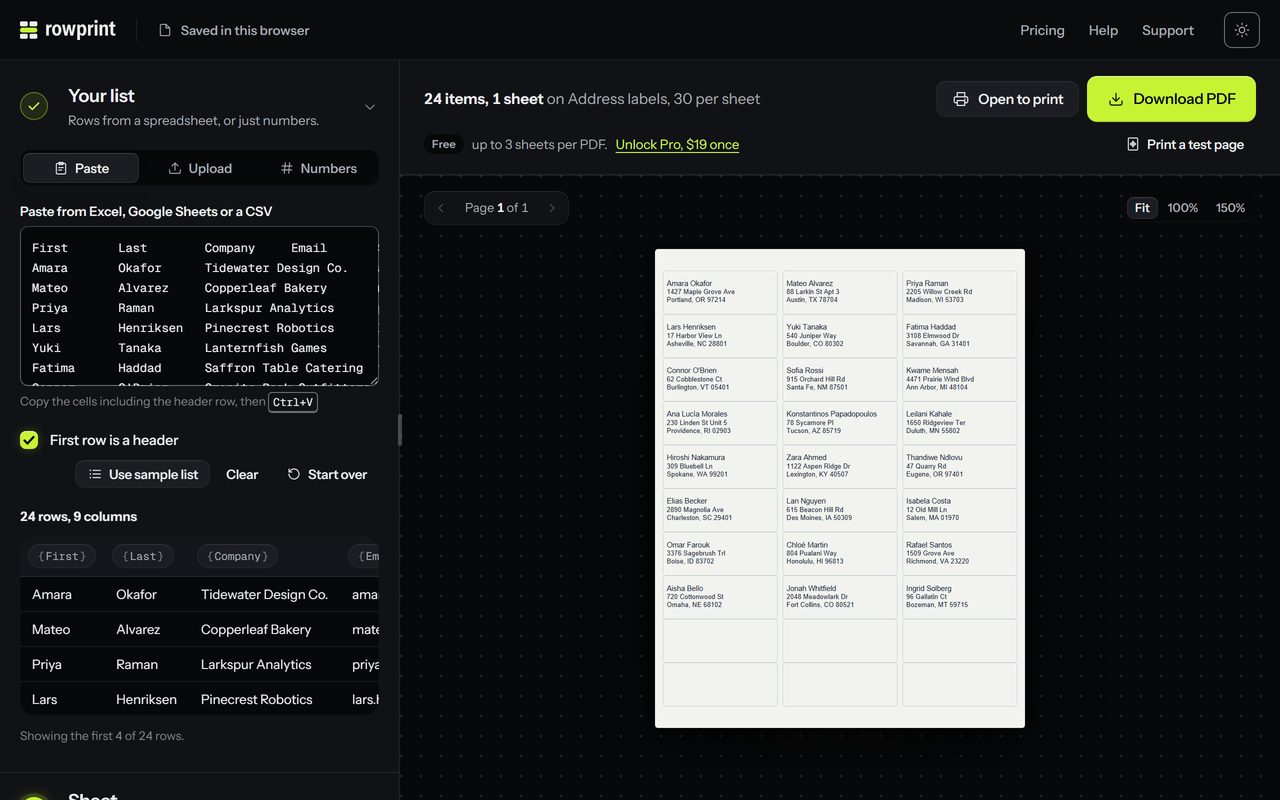
- Open Rowprint, choose Paste a list and paste. Each header becomes a field.
- Pick Address labels, 30 per sheet, or type your sheet’s number to find it.
- The label fills in from your column names: {{Name}} on the first line, {{Address}} on the second, then {{City}} , {{State}} {{ZIP}} on the third. Rowprint recognizes common column names (name, first and last, address, city, state, zip, company), and you can edit the lines afterward.
- Check the preview, download the PDF and print it.
Printing tips
- In the print dialog, choose 100% or Actual size. Fit to page shrinks the layout, and the text drifts off the labels.
- Print the test page with the label outlines on plain paper first, then hold it against a label sheet up to a window.
- Reusing a sheet with some labels already peeled off? Set Skip cells to start on the first empty label.
- ZIP codes print exactly as you paste them, so 02134 keeps its leading zero.
Coming from Microsoft Publisher
Support for Microsoft Publisher ended in October 2026. If your label layouts lived there, Rowprint is a Microsoft Publisher alternative for this job: the same Avery® sheet numbers, nothing to install, and it runs on Windows, Mac and Chromebook.