Paste the list you already have
Rows from Excel, Google Sheets, Numbers or a CSV. Columns become fields you can place.
Ready · 35 sheet sizes · Letter and A4
Paste a list from Excel or Google Sheets, pick the sheet by the number on the box, and download a PDF that lines up.
Free for up to 3 sheets per PDF, which is 90 address labels. Pro prints the whole list for $19, paid once.
35 sheet sizes, Letter and A4, and any other sheet as a custom size. Box numbers are listed for compatibility.
How it works
Nothing to install, nothing to sign in to.
01
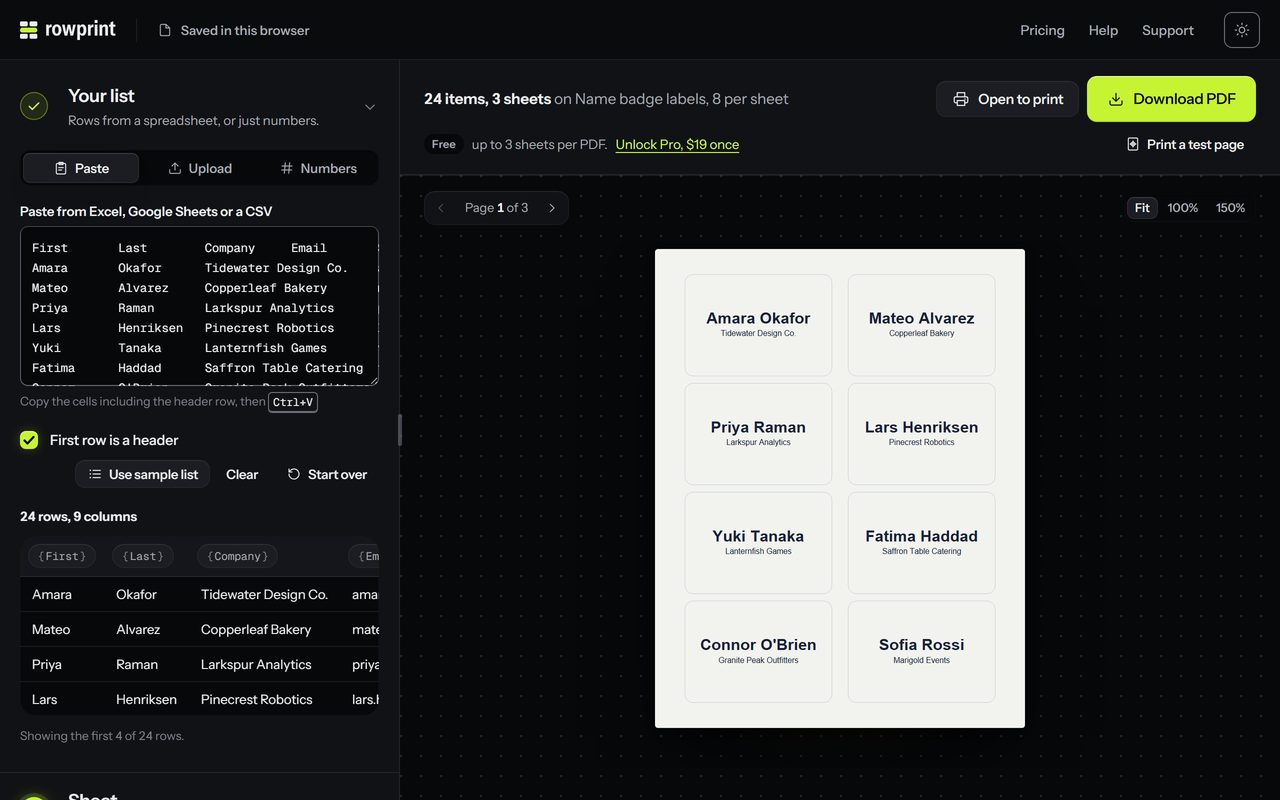
Copy the rows from Excel, Google Sheets or Numbers and paste, with or without a header row. A CSV file works too.
02
Search by the number on the box, like 5160 for address labels or 5395 for name badges. Letter and A4 are built in; any other sheet can be a custom size.
03
Place the fields, check every page in the live preview, download, and print at 100%. A little off? Print the test page and nudge by the millimetre.
In the box
Everything a print run needs, and nothing that makes you sign in first. Hover a card to run it.
Rows from Excel, Google Sheets, Numbers or a CSV. Columns become fields you can place.
Every sheet is measured in points, the unit printers use, so each line lands inside its label. Off by a hair? Nudge it by the millimetre.
Type 5160 or 5395. Letter and A4, 35 sizes.
Reading, laying out and writing the PDF all happen in this tab.
Up to 10,000 tickets, numbered so the cut piles stay in sequence.
Encode a link, an email or a ticket ID on every label.
One click, one file, nothing to install.
First names print big and shrink only as much as they must. Two tags per guest? Set copies to 2.
No subscription, nothing to cancel. Free up to 3 sheets per PDF.

The editor
Your list on the left, the sheet on the right, the PDF one click away.
What you can print
Every sheet is measured in the unit printers use, so the PDF matches the paper in the tray.



Compared
They can all make labels. Here is the catch with each.
Pricing
$0
Every sheet and design tool, up to 3 sheets per PDF: 90 address labels, 24 name tags or 30 raffle tickets.
No account, nothing uploaded.
$19once
Print the whole list, with no footer line.
14-day refund if it does not print right.
Privacy · your list stays here
Reading the list, laying out the sheet and writing the PDF all happen in this tab. There is no server for your list to go to.
Parsing, layout and PDF generation run in the browser. 0 bytes of your list leave this device.
Your last project is kept in this browser’s local storage so you can come back to it. Clear the site data and it is gone.
Visits and PDFs made are counted by Vercel Web Analytics, with the sheet number and nothing from your list, and without cookies. A Pro key goes to the license server with a platform label, a date and the store’s ID.
Ready when your list is
Paste it, pick the number on the box, download the PDF. Free for up to 3 sheets, $19 once for the whole list.
No account. Nothing is uploaded.